
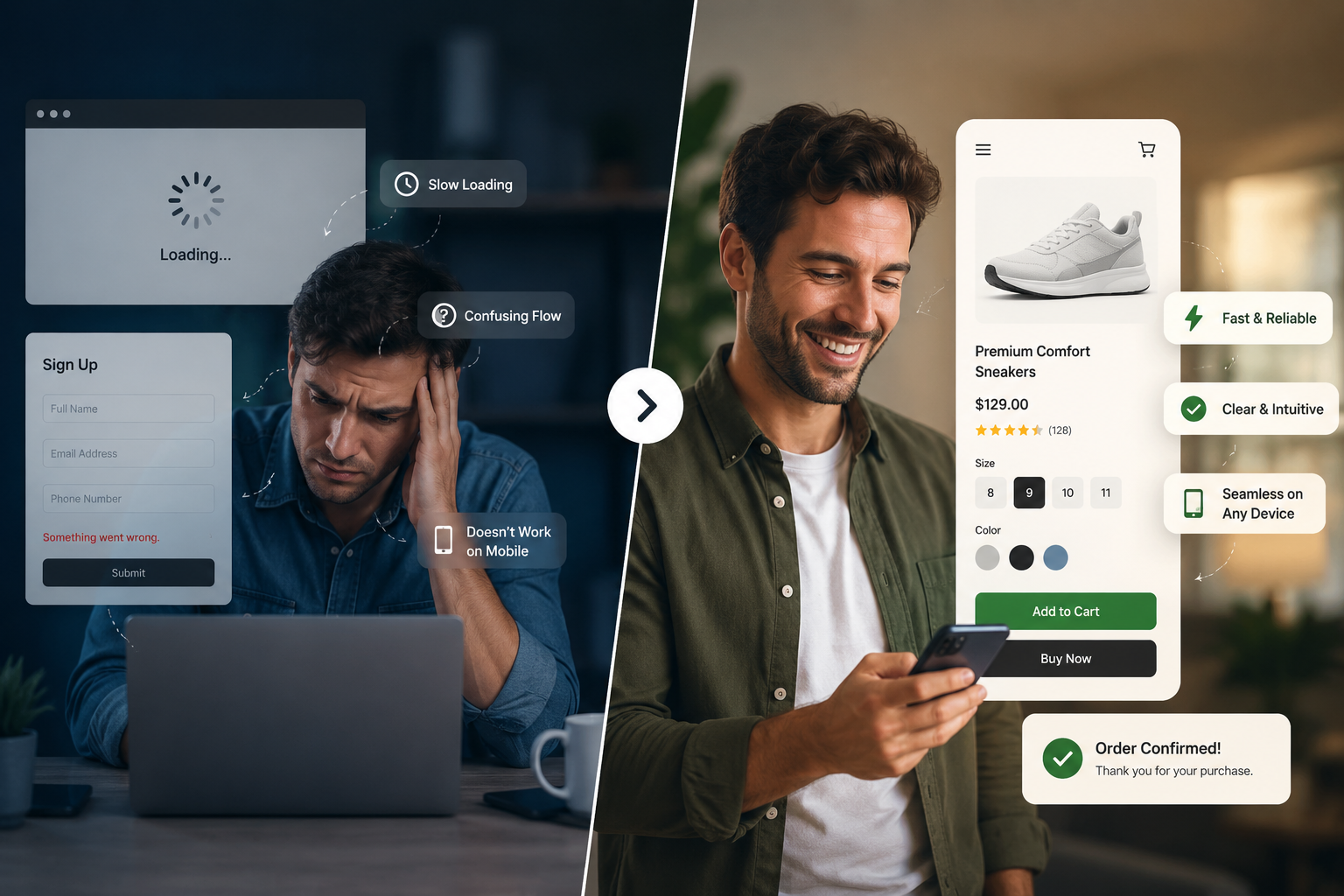
- User experience is a business metric, not just a design preference it directly affects revenue, retention, and brand trust.
- Even small friction points (slow load times, confusing forms, weak CTAs) compound into significant customer and revenue loss.
- The most common UX failures, poor mobile experience, complicated checkout, weak navigation are also among the most fixable.
- Businesses that invest in UX see measurably higher conversions, stronger loyalty, and better long-term ROI than those that don’t.
- Modern technology like AI, personalization engines, and cross-platform apps can meaningfully improve UX but only when implemented with real strategy behind them.
- UX is not a one-time project. Continuous testing and iteration are what separate businesses that improve over time from those that quietly lose customers.
According to Zippia’s 2026 UX research, 70% of online businesses fail due to poor usability, and 88% of online shoppers won’t return to a website after a single bad experience. First impressions form almost instantly often within 15 seconds and once a customer decides your digital experience isn’t worth their time, no amount of retargeting ads will win them back.
In this guide, you’ll learn exactly what user experience means in business terms, why it’s become a competitive advantage rather than a design afterthought, the specific reasons businesses lose customers to poor UX, and practical steps to fix it all explained without technical jargon.
What Is User Experience (UX)?
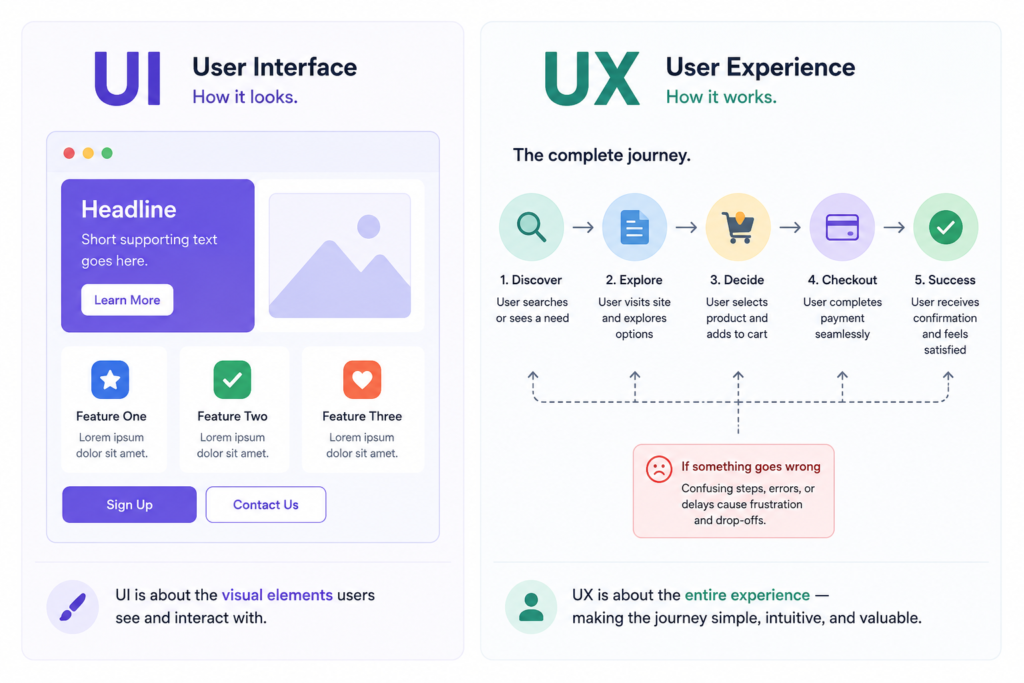
Many business owners use “UX” and “UI” interchangeably, but they’re not the same thing.
UI (User Interface) is what something looks like — the colors, buttons, fonts, and layout.
UX (User Experience) is how something works — how easily a customer can find what they need, complete a purchase, or get a question answered.
A beautifully designed app can still have terrible UX if the checkout process takes eight steps or the navigation is unclear. Good UX isn’t just about looking polished, it’s about removing friction at every point where a customer interacts with your business.
UX directly shapes customer satisfaction because it determines whether an interaction feels effortless or frustrating. And usability and accessibility aren’t separate concerns from business success, they’re core drivers of it. A product that’s hard to use loses customers regardless of how good the underlying service or offer is.
Why User Experience Matters More Than Ever
A decade ago, businesses could compete primarily on price or product. Today, digital experience is often the deciding factor.
Rising Customer Expectations: Customers now compare every digital experience against the best ones they’ve used regardless of your industry. If checkout feels harder on your site than on Amazon, that’s the standard you’re being judged against.
Mobile-First Behavior: More than half of global web traffic now comes from mobile devices, and mobile users are far less patient with friction than desktop users. A clunky mobile experience isn’t a minor issue anymore it’s often your primary storefront.
Digital Competition: Your competitor is never more than one tab away. If your experience creates friction, switching costs for the customer are close to zero.
Customer Loyalty: Loyalty today is earned through consistency and ease, not just price or product quality. A single frustrating experience can undo months of brand-building.
Brand Perception: Every interaction with your digital product shapes how customers perceive your brand’s overall competence and trustworthiness fairly or not.
In short, UX has shifted from being a “nice-to-have” design element to a core competitive advantage that directly influences whether customers choose you or your competitor.
The Hidden Cost of Poor User Experience
Poor UX rarely shows up as a single obvious failure. Instead, it quietly erodes performance across nearly every part of the business:
- Customer Trust: A confusing or broken experience signals a lack of attention to detail, which customers subconsciously extend to your entire brand.
- Revenue: Research from DesignRush found that slow-loading websites alone cost businesses an estimated $6.8 billion annually, largely through abandoned sessions and lost conversions.
- Lead Generation: Marketing teams spend heavily to drive traffic, but poor UX means a large share of that traffic never converts, wasting acquisition budget.
- Customer Retention: Frustrated customers don’t complain they simply leave. Industry research shows the vast majority of unhappy customers churn silently, without ever giving feedback.
- Brand Reputation: Dissatisfied customers are significantly more likely to share their experience with others, amplifying reputational damage well beyond the original interaction.
- Marketing ROI: Every marketing dollar spent driving traffic to a poor experience is a dollar with a diminished return.
- Customer Acquisition Cost: When conversion rates drop due to UX friction, the cost to acquire each paying customer rises proportionally even if your marketing performance stays the same.
Top Reasons Businesses Lose Customers Due to Poor UX
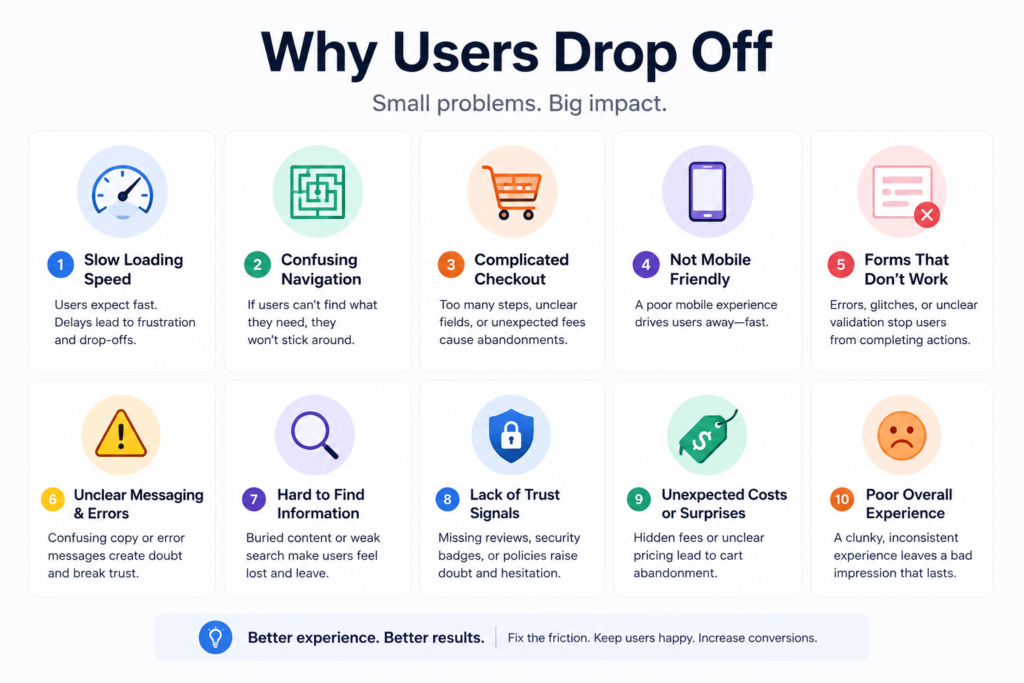
1. Slow Website or App Performance
The problem: Pages or screens that take more than a few seconds to load.
Why users leave: Patience for loading time is extremely limited many users abandon a page that takes longer than three seconds to load, and a one-second delay alone can reduce conversions meaningfully.
Business impact: Lost sales, lower search rankings, and wasted ad spend on visitors who never see your offer.
Practical solution: Regular performance audits, image and code optimization, and a modern technical foundation built with Website Development best practices in mind.
2. Confusing Navigation
The problem: Users can’t find what they’re looking for within a few clicks or taps.
Why users leave: Research shows a majority of users will abandon a site entirely if completing a simple action takes too many steps.
Business impact: Higher bounce rates and lower engagement across the entire site or app.
Practical solution: Simplify menu structures, use clear labeling, and test navigation with real users not just internal teams.
3. Complicated Checkout Process
The problem: Too many steps, unexpected fees, or forced account creation before purchase.
Why users leave: Checkout friction is one of the single biggest drivers of cart abandonment across e-commerce.
Business impact: Direct, measurable revenue loss often the most expensive UX problem a business can have.
Practical solution: Offer guest checkout, minimize form fields, and clearly display total costs upfront. Baymard Institute research suggests fixing core checkout UX issues can meaningfully lift conversion rates.
4. Poor Mobile Experience
The problem: Sites or apps that weren’t properly designed or tested for mobile devices.
Why users leave: Mobile users are significantly more likely to abandon a task than desktop users when a page isn’t mobile-optimized.
Business impact: Given that mobile now drives the majority of web traffic, this single issue can undercut an entire digital strategy.
Practical solution: Prioritize mobile-first design and invest in proper Mobile Application Development rather than treating mobile as an afterthought to desktop.
5. Difficult Registration Forms
The problem: Long forms asking for unnecessary information before a customer sees any value.
Why users leave: Every additional form field is another opportunity for a customer to give up.
Business impact: Lower sign-up and lead conversion rates, directly affecting the sales pipeline.
Practical solution: Ask only for essential information upfront, and offer social or single-click sign-in options where possible.
6. Inconsistent Design
The problem: Different fonts, colors, button styles, or layouts across pages or platforms.
Why users leave: Inconsistency creates subconscious doubt about whether a site or app is trustworthy or well-maintained.
Business impact: Reduced brand credibility, which can suppress conversions even when the offer itself is strong.
Practical solution: Establish and enforce a design system across your website, app, and marketing materials.
7. Lack of Accessibility
The problem: Digital products that are difficult or impossible to use for people with disabilities.
Why users leave: A significant share of the top million websites still contain detectable accessibility errors, according to WebAIM meaning many businesses are unintentionally excluding real customers.
Business impact: Lost customers, potential legal exposure, and reputational risk.
Practical solution: Build accessibility into design and development from the start, rather than retrofitting it later.
8. Poor Search Functionality
The problem: On-site search that returns irrelevant results or fails to understand common misspellings and phrasing.
Why users leave: Customers who can’t find a specific product or answer quickly will assume it doesn’t exist even if it does.
Business impact: Missed sales opportunities, particularly for larger product catalogs or content libraries.
Practical solution: Invest in smarter, AI-assisted search that understands intent rather than exact keyword matches.
9. Weak Calls-to-Action
The problem: Buttons and prompts that are vague, hard to find, or unclear about what happens next.
Why users leave: Uncertainty creates hesitation, and hesitation kills conversions.
Business impact: Traffic and interest fail to translate into leads or sales.
Practical solution: Use clear, specific action language, and ensure CTAs are visually prominent and consistently placed.
10. Too Many Pop-ups and Distractions
The problem: Aggressive pop-ups, auto-playing videos, or intrusive overlays that interrupt the user’s task.
Why users leave: These elements are consistently ranked among the most frustrating experiences customers report, especially on mobile.
Business impact: Higher bounce rates and a negative brand impression that lingers beyond the visit.
Practical solution: Use pop-ups sparingly, time them appropriately, and always make them easy to dismiss.
11. Broken Links and Technical Issues
The problem: 404 errors, broken buttons, or features that simply don’t work as expected.
Why users leave: Technical failures signal neglect, and customers rarely give a second chance after encountering one.
Business impact: Lost trust and lost conversions, often compounded by damage to SEO performance.
Practical solution: Regular QA testing and monitoring, ideally supported by ongoing Software Development maintenance rather than a “build it and forget it” approach.
12. Slow Customer Support Experience
The problem: Long wait times, unhelpful automated responses, or no clear way to reach a human when needed.
Why users leave: Support is often the moment of truth a bad support experience after a bad product experience virtually guarantees churn.
Business impact: Increased churn and lower customer lifetime value.
Practical solution: Combine responsive human support with well-designed AI chatbots that handle common questions instantly, escalating complex issues quickly.
How Poor UX Hurts Business Growth
| Business Metric | Impact of Poor UX |
|---|---|
| Conversion Rates | Directly reduced — friction at any step of the journey suppresses the percentage of visitors who take action |
| Customer Retention | Lower — frustrated customers rarely return, and most never explain why |
| Brand Trust | Weakened — inconsistent or broken experiences signal a lack of care |
| Online Reviews | More negative reviews, since dissatisfied customers are far more vocal than satisfied ones |
| SEO Performance | Hurt indirectly — high bounce rates and slow load times are factors search engines weigh in rankings |
| Revenue | Reduced — every friction point along the funnel compounds into measurable revenue loss |
| Lifetime Customer Value (LTV) | Lower — customers who have a poor experience buy less often and spend less over time |
Signs Your Business Has a UX Problem
If you’re unsure whether UX is holding your business back, watch for these warning signs:
- High bounce rate: Visitors leave almost immediately after arriving, often a sign of confusing design, slow load times, or unclear messaging.
- Low conversions: Traffic is healthy, but very few visitors complete a purchase, sign-up, or desired action.
- Cart abandonment: Customers add items to their cart but don’t complete checkout, often due to friction or unexpected costs.
- Low engagement: Users visit but don’t explore further, spend little time on the site, or rarely return.
- Poor customer feedback: Reviews or support tickets repeatedly mention confusion, frustration, or difficulty completing tasks.
- High uninstall rate: Mobile app users download the app but delete it shortly after, often due to poor onboarding or performance issues.
- Low repeat customers: First-time buyers rarely come back, suggesting the initial experience didn’t build enough trust or satisfaction.
- High support requests: A flood of basic questions often signals that the product itself isn’t intuitive enough to use without help.
How Great UX Helps Businesses Grow
The flip side of everything above is equally powerful. Businesses that invest in great UX consistently see:
- Higher Conversions: Removing friction directly increases the percentage of visitors who take action, with some businesses seeing conversion lifts of well over 100% after meaningful UX improvements.
- Better Customer Satisfaction: Smooth, intuitive experiences build genuine goodwill toward a brand.
- Increased Sales: More completed transactions from the same amount of traffic, improving overall marketing efficiency.
- Stronger Brand Loyalty: Customers return to products that respect their time and make tasks easy.
- Better SEO: Lower bounce rates and longer engagement send positive signals to search engines.
- Higher Engagement: Users explore more, interact more, and are more likely to convert on secondary offers.
- Lower Support Costs: Intuitive products generate fewer confused support tickets.
- Better ROI: Forrester’s widely cited research suggests that every dollar invested in UX can return significant multiples in business value, making it one of the highest-leverage investments a business can make.
UX Best Practices Every Business Should Follow
- User Research:Talk to real customers before assuming what they want.
- Customer Journey Mapping: Understand every touchpoint a customer has with your business, not just the final purchase step.
- Mobile-First Design: Design for the smallest screen first, then scale up not the reverse.
- Fast Loading Speed: Treat performance as a core feature, not a technical afterthought.
- Clear Navigation: Make it obvious where to go and what to do next at every step.
- Consistent Branding: Maintain visual and tonal consistency across every platform and touchpoint.
- Accessibility: Design for the widest possible range of users and abilities from day one.
- Personalization: Use data responsibly to tailor experiences without feeling invasive.
- Continuous Usability Testing: UX isn’t a one-time project; testing with real users on an ongoing basis catches issues before they hurt the business.
- Performance Optimization: Regularly audit and improve technical performance as your product and traffic grow.
The Role of Modern Technologies in Better UX
Technology has become one of the most powerful levers for improving UX at scale:
Artificial Intelligence analyzes user behavior patterns to identify friction points humans might miss, and increasingly powers real-time personalization decisions.
Personalization Engines tailor content, product recommendations, and messaging to individual users, a proven driver of both satisfaction and conversions.
Chatbots provide instant answers to common questions, reducing wait times and support costs while improving the customer’s sense of being helped quickly.
Predictive Analytics anticipates customer needs flagging likely churn risks or surfacing the next best action before a customer even asks.
Automation streamlines repetitive processes like order confirmations, account setup, and follow-up communications, removing friction without adding headcount.
Progressive Web Apps (PWAs) combine the speed and reach of a website with the engagement and performance of a native app an increasingly popular middle ground for businesses.
Cross-Platform Mobile Apps ensure a consistent, high-quality experience across iOS and Android without doubling development effort.
None of these technologies deliver value on their own; they need to be implemented thoughtfully. This is where AI Consulting, skilled Mobile App Development, robust Web Application Development, and custom Software Development come together to turn these tools into a genuinely better customer experience rather than more complexity bolted onto an already confusing product.
Real-World Business Examples
E-commerce — Retailers that simplified checkout flows and added guest checkout options have seen meaningful reductions in cart abandonment and corresponding revenue gains.
Healthcare — Patient portals redesigned around simpler scheduling and clearer communication have improved appointment adherence and patient satisfaction scores.
Banking — Digital banks that prioritize intuitive mobile experiences consistently report that ease-of-use is a top reason customers choose one bank over another.
SaaS — Products that invest in clearer onboarding flows see measurably better trial-to-paid conversion rates, since new users form an opinion of the product within their first few sessions.
Education — Learning platforms that simplified navigation and reduced the number of clicks to start a lesson report higher course completion rates.
Logistics — Companies that improved real-time tracking interfaces and self-service options have reduced support ticket volume while improving customer satisfaction.
The Future of User Experience
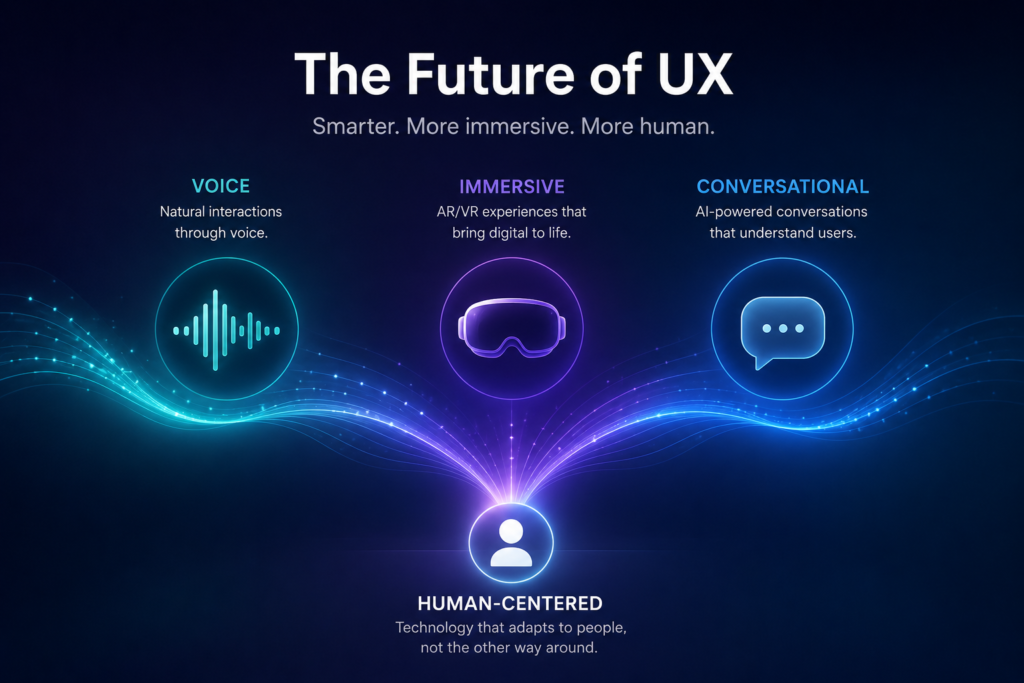
UX continues to evolve quickly, and forward-thinking businesses are already preparing for what’s next:
- AI-Powered UX — Interfaces that adapt in real time based on individual user behavior.
- Voice Interfaces — Hands-free interaction becoming a standard, not a novelty.
- Hyper-Personalization — Experiences tailored so precisely they feel built for a single user.
- Predictive UX — Products that anticipate a user’s next need before they express it.
- Conversational AI — More natural, context-aware chat and voice assistants replacing rigid menu-based support.
- AR/VR Experiences — Immersive product visualization, particularly in retail and real estate.
- Zero-Click Experiences — Information and actions delivered without requiring the user to search or click through multiple steps.
- Accessibility by Design — Inclusive design becoming a baseline expectation rather than a compliance checkbox.
Conclusion
User experience has moved far beyond being a design department’s responsibility. It’s a direct, measurable driver of customer acquisition, retention, and long-term business growth which is exactly why so many businesses lose customers due to poor user experience without ever fully understanding why. The good news is that UX problems are almost always fixable once they’re properly identified and prioritized.
Businesses that treat UX as a strategic investment not an afterthought consistently outperform those that don’t, in conversions, customer loyalty, and brand reputation. The question isn’t whether your business can afford to invest in better UX. Given the data, it’s whether your business can afford not to.
Ready to Evaluate Your Digital Experience?
If any of the issues in this guide sound familiar slow load times, confusing navigation, high cart abandonment, or a mobile experience that feels like an afterthought it may be time for a closer look at your digital products.
Whether it’s a UX audit of your existing platform, a rebuild through expert Website Development, a Web Application Development project built around real customer journeys, a Mobile Application Development initiative designed mobile-first from day one, custom Software Development to fix specific friction points, or AI Consulting to bring intelligent personalization into your customer experience, the right technology partner can turn a leaking funnel into a growth engine.
Visit Agile Stormers to start the conversation: no pressure, just an honest look at where your digital experience stands today, and what fixing it could mean for your bottom line.